
Creative Claw Review: AI Characters, Voice and Video in ChatGPT
Hands-on Creative Claw review: 12 image, video, voice and music tests inside ChatGPT, with credit costs, privacy notes and where it falls short.

Disclosure: Creative Claw gave Tekanology free credits to run these tests. Full details are at the end of this review.
In our multi-scene test with Seedance 2.5, a saved character's facial features and hairstyle stayed consistent across all three clips. The same test also showed where Creative Claw fell short: the final video felt like three separate clips rather than one continuous sequence.
Creative Claw describes itself as a remote Model Context Protocol service for AI-powered creative media generation. We tested it as an app inside ChatGPT, calling it from the chat. Every result here comes from our own hands-on testing, and every assessment and conclusion is our own judgement.
Creative Claw's main advantage is keeping different production tasks in the same ChatGPT workflow. In our tests, that meant comparing image and video models, generating audio and reusing a saved character across scenes. A separate talking-avatar test combined a saved character with a saved voice clone.
That gives the model selection a practical purpose: choosing tools for different jobs while reusing work you have already created. It does not remove the need to check which model ran or refine the finished results.
The short version
- Verdict: recommended, with conditions (see the verdict below). In our testing, value was strong for image and audio work, reasonable for short videos and more variable for complex video.
- Good fit: short talking-avatar clips that reuse a saved character and voice clone; ours performed strongly in a 3-second test.
- Less ideal for: finished video ads; our one test ad would work better as an animated storyboard or promotional concept.
- Price: you can buy credits as needed without a subscription, but optional subscription plans are also available. New accounts receive 100 credits free on signup.
- Images: in our first image test, ChatGPT's built-in image generator was the clear winner, and within Creative Claw, GPT Image 2.5 Sunburst outperformed Nano Banana 2 while costing fewer credits.
- Video score: Gemini Omni 1.1 Flash scored 9/10 overall in our 8-second video test.
- Weak spot: in our sound-effects test, only one of the four requested sound elements was generated.
How Creative Claw was tested
We tested Creative Claw from 9 to 16 October 2026. Customer support was not evaluated in our testing.
At the time of testing, Creative Claw's Model Inventory listed 59 AI models across four categories: 13 image, 28 video, 13 speech and 5 audio models. It set out each model's capabilities and limits, such as editing restrictions, maximum video duration, required reference inputs and workspace eligibility; availability may change over time.
Treat each model name in this review as a label, not as proof of the underlying model, and check Creative Claw's current price list for today's names. That list now names Nano Banana 2.1, for instance.
The tests covered:
- Easy image test: an EverlinBooks logo turned into a studio product photo, compared with ChatGPT's own image generator.
- Difficult image test: an event poster with exact text and three tools in set positions.
- Easy video test: an 8-second continuous shot of a person picking up an apple.
- Difficult video test: a 12-second train station café scene with timed actions and a wall clock.
- Ad test: a 15-second commercial for a fictional energy drink.
- Speech: a celebratory announcement read by an ElevenLabs v4 voice.
- Sound effects: café ambience with three timed sound events.
- Music: a 30-second track with vocals disabled.
- Voice cloning: a clone made from a smartphone recording.
- Character generation: a stylised avatar made from a personal photograph.
- Multi-scene video: three connected scenes with a saved character.
- Lip sync: a 3-second talking clip with a saved character and voice clone.
How to read the results: the image tests involved different prompts and settings, so treat their findings as observations rather than definitive pricing or performance comparisons. Results in any test can also vary with the model, settings, prompt and conditions used.
For the wider method, see Tekanology's testing methodology.
Getting started in ChatGPT: check what actually ran
To try it yourself, open Creative Claw's ChatGPT listing. The vendor's connection guide covers setup.
In our ChatGPT tests, mentioning Creative Claw in a prompt did not guarantee that the plugin handled image generation: two images we requested through it were generated by ChatGPT's built-in image generator instead, which we confirmed by checking Creative Claw's credit balance and generation history.
Model choice needed watching too: when we asked for GPT Image 2, Creative Claw initially selected GPT Image 2.5 Sunburst.
A completed Creative Claw image also did not appear as expected in the ChatGPT conversation, although the generation was successful, and had to be opened through Creative Claw's direct image link. Inconsistent plugin activation, unexpected model selection and image-display difficulties weakened the overall experience.
Beginner tips
- We recommend typing @Creative Claw and picking it from ChatGPT's app suggestions, rather than only naming it in the prompt; even then, check which service ran.
- Check the Model Inventory before generating images, especially when you want a particular model.
- If a generation fails, Creative Claw's help centre says your account activity shows whether its credits came back.
Image generation
Easy test: an EverlinBooks logo as a product photo
Settings: Creative Claw's Nano Banana 2 (Default) and GPT Image 2.5 Sunburst (Preferred Model), against ChatGPT's built-in image generator, with an EverlinBooks logo as the reference image.
The task: a clean, premium e-commerce hero photo of the exact product on a warm neutral studio background, lit by one large softbox from the upper left, keeping its real shape and proportions, with its labelling and markings intact and no invented logos or extra pieces.
Ranking: ChatGPT's built-in generator was best overall, GPT Image 2.5 Sunburst a close second at 14 credits, and Nano Banana 2 the flattest and closest to the original style at 16 credits.
ChatGPT produced the best overall result, with realistic directional lighting, convincing shadows, strong depth and the most professional studio presentation. GPT Image 2.5 Sunburst came a close second with similar lighting and depth, while keeping the branding recognisable.
Nano Banana 2 kept the logo's lettering and proportions reasonably well, but its image looked noticeably flatter: the lighting was weaker and the depth minimal. Because Nano Banana 2 stayed closer to the flat look of the original graphic, it preserved the design style more faithfully.
GPT Image 2.5 Sunburst was charged 14 credits.
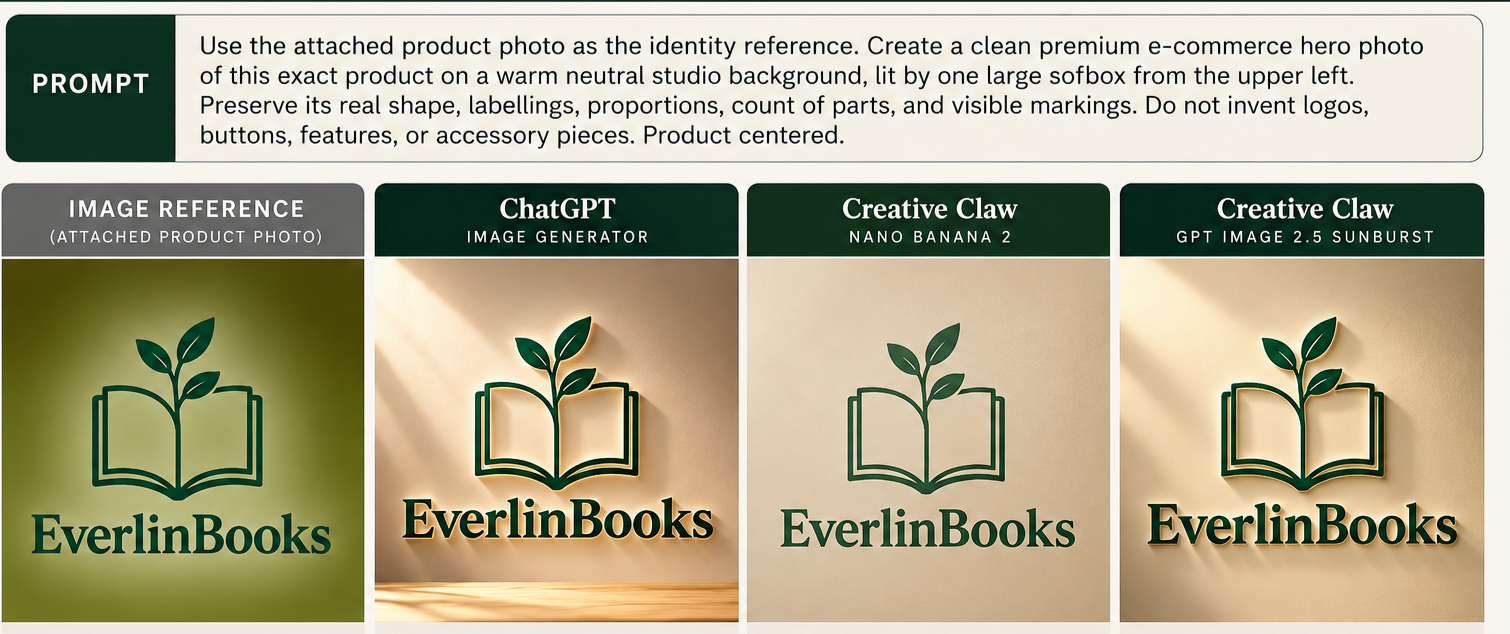
The easy image test board, with the reference logo and the three generators' outputs side by side.
Difficult test: the Maker's Night 2026 poster
Settings: Nano Banana 2 and GPT Image 2 in Creative Claw, against ChatGPT's built-in generator.
The task: a vertical poster with the exact headline "MAKER'S NIGHT 2026", the subtitle "Friday • 7:30PM" and the footer "ENTRY FREE", showing exactly three tools on a wooden desk, with a blue tape measure to the left of a screwdriver and a stainless steel ruler behind both, in a clean black and cream palette.
Ranking: ChatGPT's built-in generator came first, GPT Image 2 came second at 36 credits and Nano Banana 2 came third at 16 credits.
All three followed the core requirements: the text was correct in every output, and each showed exactly three tools in the right colours and positions, with an orange-handled screwdriver in every output.
Their visual finish differed: ChatGPT's poster looked the most professional and had warm, realistic lighting. GPT Image 2 came visually close to it, while Nano Banana 2 was technically accurate but flatter. GPT Image 2 cost 36 credits and Nano Banana 2 cost 16, so the stronger GPT Image 2 result raises a value-for-money question.
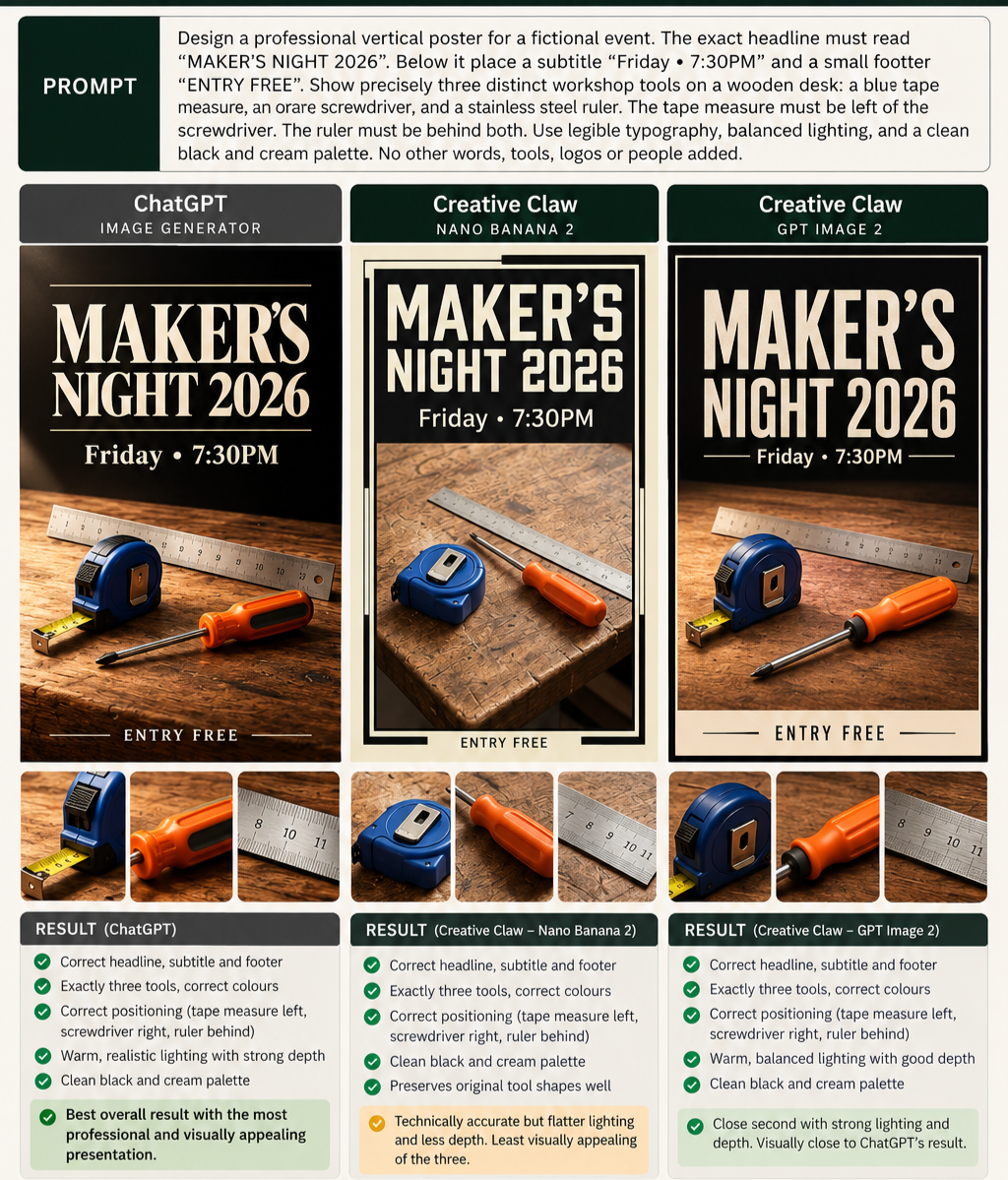
The difficult image test board, with each poster, close-ups of the tools and the result boxes.
Verdict: prompt accuracy alone did not guarantee superior image quality, and higher credit consumption did not necessarily translate into better value.
Video generation
In our video tests, an approval step before generation let us review the estimated credit cost, edit the original chat prompt and check settings such as the model, duration, resolution, aspect ratio and audio options.
We rate it one of Creative Claw's strongest features: it gave us more control over the output and a chance to catch wrong settings before spending credits, though final charges may still differ from the estimate.
Easy test: the 8-second apple pickup
Settings: 8 seconds, one fixed continuous shot.
The task: a realistic shot of a person in a plain blue long-sleeved shirt at a wooden kitchen table who picks up one red apple and holds it steady in front of the chest, filmed in natural daylight by a locked-off camera with no cuts and no dialogue or music.
- The scorecard for Gemini Omni 1.1 Flash gives 9/10 overall: prompt accuracy 9/10, realism 9/10, character consistency 9/10, object accuracy 9/10, scene and environment 9/10, and artefacts and issues 8.5/10.
- The scorecard for Seedance 2.5 gives 8.5/10 overall: prompt accuracy 9/10, realism 8.5/10, character consistency 9/10, object accuracy 9/10, scene and environment 8/10, and artefacts and issues 7.5/10.
Both generations were priced at 190 credits, although the first Gemini Omni 1.1 Flash generation was free through a Creative Claw promotional offer. Both produced convincing results with strong realism and natural lighting, a believable person and object, and no major visible artefacts in the frames we compared.
Gemini Omni 1.1 Flash gave a sharper, more detailed image with a realistic kitchen, while Seedance 2.5 looked softer and more cinematic, with a simpler background.
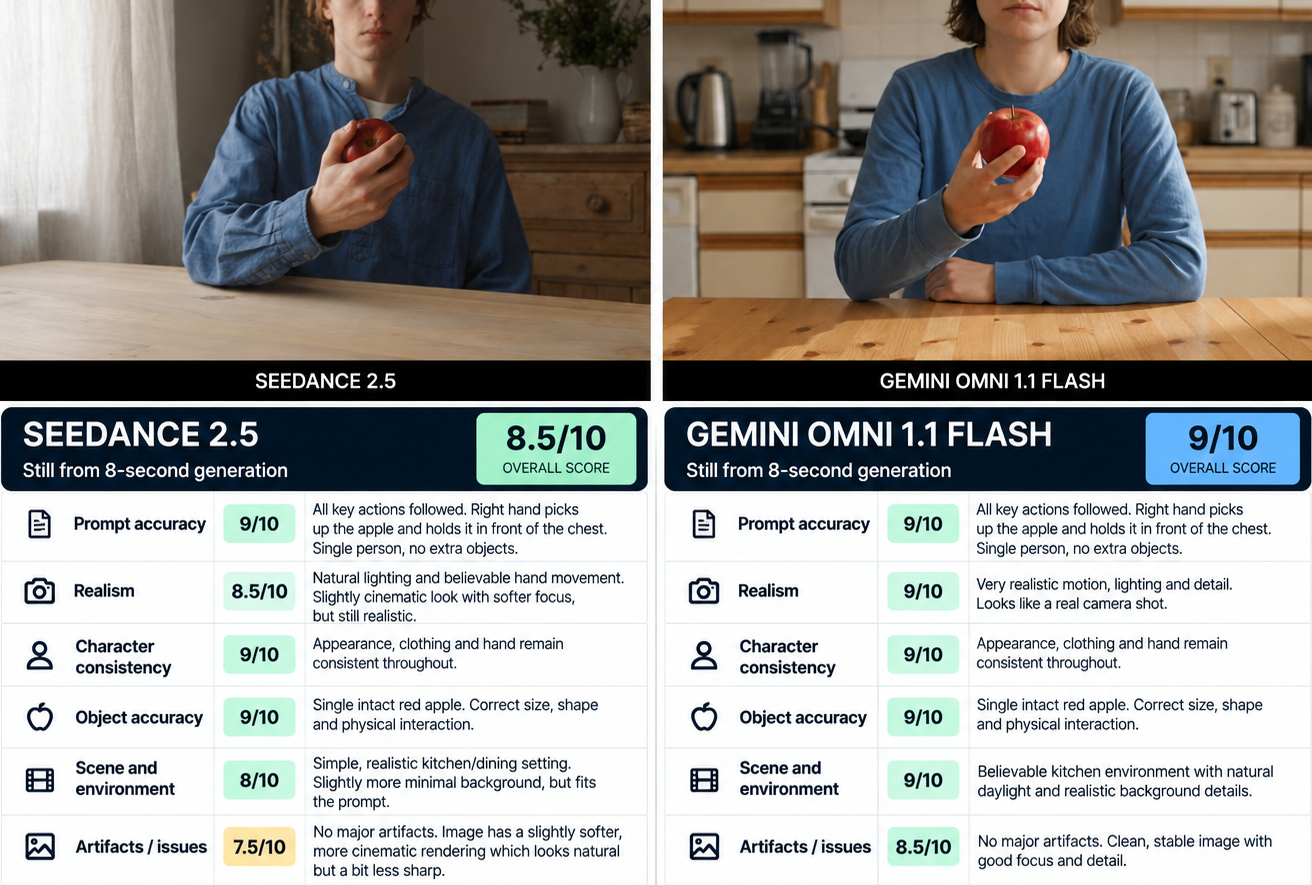
The scorecard for the 8-second apple test, with a still from each model and its scores.
Verdict: Gemini Omni 1.1 Flash performed better on speed, resolution and overall visual quality, delivering a 720p video in 30 seconds. Seedance 2.5 needed 2 minutes and 8 seconds for its 480p output.
Difficult test: the 12-second train station café
Settings: 12 seconds, several timed actions, one fixed continuous shot.
The task: a woman with shoulder-length curly black hair in a forest green jacket closes a black notebook and stands, picks up a blue backpack and turns to the exit, then walks towards the exit holding it, with a wall clock showing 2:50, no cuts or camera movement, and no duplicate items.
| Model | Resolution | Time | Credits |
|---|---|---|---|
| Seedance 2.5 | 480p | 8 minutes 14 seconds | 285 |
| Kling 3.0 Omni | 720p | 4 minutes 27 seconds | 164 |
Kling 3.0 Omni rendered at a higher resolution than Seedance 2.5, in less time and for fewer credits. Both captured the main scene and character requirements but struggled with precise details.
Neither got the clock right: the Seedance 2.5 clock was blurred and incorrect, while the Kling 3.0 Omni clock showed 10:08 instead of 2:50. Kling 3.0 Omni also added a half-filled glass that the prompt did not ask for, and the notebook stayed open after the woman stood up.
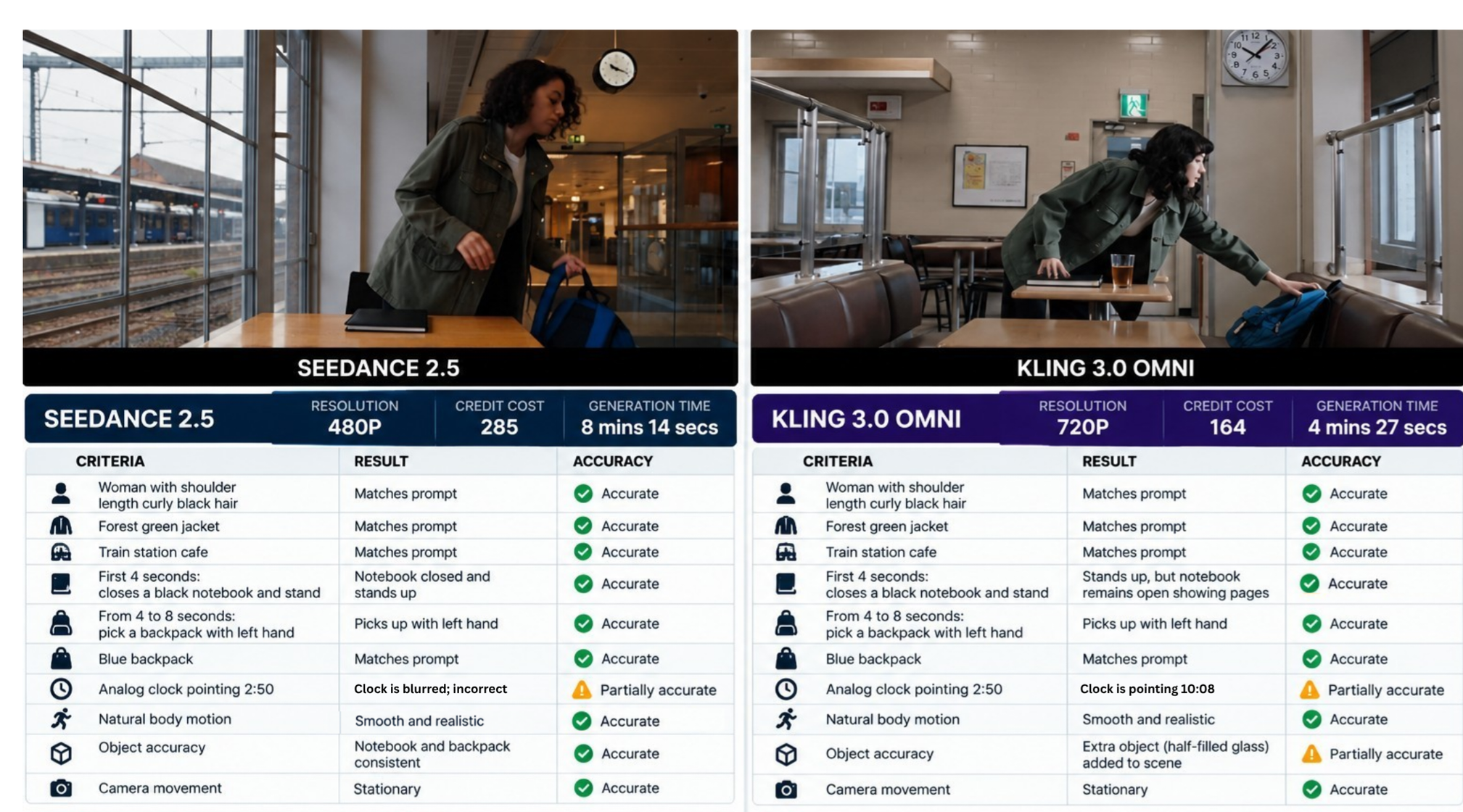
The scorecard for the 12-second café test, with resolution, credits and generation time for each model.
Verdict: Seedance 2.5 kept objects more consistent and Kling 3.0 Omni moved more smoothly, but neither fully satisfied the prompt.
Ad test: a 15-second Volt Rush commercial
Settings: 1080p, 15 seconds, 9:16 vertical, Medium effort; it took 8 minutes 44 seconds and used 460 credits.
Creative Claw offered three production quality settings with these credit ranges for this project: Light (25 to 305 credits), Medium (214 to 620 credits) and High (345 to 1,022 credits). For this project, Creative Claw's settings described an initial 200-credit hold when production begins, with the final cost based on the AI agent's work and the media it generates.
We chose Medium, but ChatGPT first told us the ad had used High. When we questioned this, ChatGPT explained that the request had first gone out at High effort and that our Medium choice in Creative Claw's approval screen overrode that setting; the ad was ultimately produced at Medium.
The task: a polished 15-second commercial for a fictional energy drink, Volt Rush (Blue Lightning), with five precisely timed sequences, from the can rotating into frame to a final hero shot of the centred can with readable text.
The product itself held up well: the blue Volt Rush can, lightning symbol included, stayed recognisable across shots and angles, and the final display carried the requested headline, tagline and call to action. The ad also kept the planned three-second scene intervals in order.
Movement was the biggest weakness: instead of fully animated sequences, the finished ad played like a slideshow with basic zoom-in and zoom-out effects, which hurt most in the shots that needed action, such as the can rotating and opening.
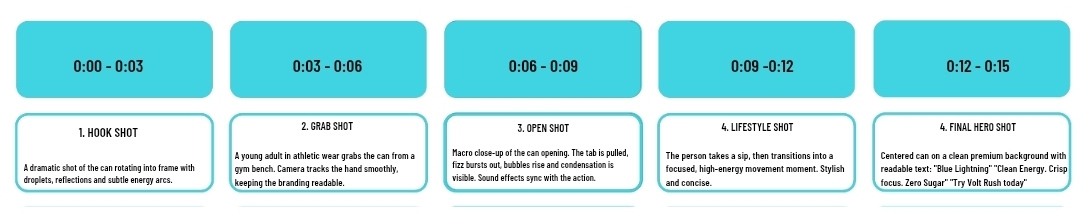
The ad test's storyboard strip, shown under the prompt, from the hook shot to the final hero shot.
Verdict: strong potential for planning and visualising product ads, but this particular ad was not convincing as a finished commercial and would work better as an animated storyboard or promotional concept.
Audio generation: strong speech, weaker timing
Speech: ElevenLabs v4
Speech generation with ElevenLabs v4 delivered an excellent result: accurate pronunciation and natural pacing.
Using Robert, a professional American English voice, the model read the dollar amount in our script correctly and left a well-placed silence before moving into genuine excitement for the celebratory announcement. The emotional delivery was particularly impressive, as the prompt did not explicitly specify an excited tone.
The clip cost 2 credits and gave clear, professional narration without background music. The listed rate for ElevenLabs v4 is 20 credits per 1,000 characters.
Sound effects: ElevenLabs Sound Effects v2
The task: realistic café ambience with continuous light rain, a doorbell at 3 seconds, footsteps at 6 seconds and a cup placed on a saucer at 9 seconds.
The generation produced 12 seconds of audio in 3.49 seconds for 5 credits. The rain sounded realistic and stayed subtle, but none of the three requested sound events occurred; an unrelated spoon-against-glass sound appeared between about 3 and 8 seconds instead.
Verdict: based on this test, the model was unsuitable for precisely timed, multi-event sound design, though it showed promise for simple environmental ambience.
Music generation
Settings: elevenLabs-music-v2.5, with a generation time of 9.4 seconds, 15 credits used, 30 seconds of audio, a target tempo of about 115 BPM in 4/4 and vocals disabled.
The task: an upbeat instrumental pop track (no vocals or electric guitar) with a soft synth intro, an energetic chorus driven by drums and bass, and a solo piano ending in the final four seconds.
The track opened with soft synths, moved into a clear, more energetic chorus, avoided electric guitar and ended cleanly. The drums-and-bass build-up was hard to make out, and the solo piano ending never arrived. The result was musically usable, but in this test unreliable for precise instrument sequencing and arrangement instructions.
Saved characters and voice clones
Voice cloning with Cartesia
Settings: a personal recording made on a smartphone; the voice-cloning test used 5 credits.
Audio files could not be uploaded directly through the chat's "+" attachment button in our test. Asking for a voice clone in the conversation opened Creative Claw's private audio upload panel instead, which allowed the recording to be uploaded straight from a phone without the extra steps in Creative Claw Studio.
Before cloning, Creative Claw asked us to confirm we owned the recording or had the speaker's permission, and to accept its voice-cloning terms and privacy notice.
From a sample recorded in a flat, narrative tone, Cartesia reproduced the voice with remarkably close similarity in neutral narration. The likeness weakened when the generated speech shifted towards an excited tone, and characteristics resembling the default female AI voice became noticeable.
Verdict: in this test, highly effective for straightforward narration at a low credit cost, and less reliable when expressive delivery was required.
Character generation with Nano Banana 2
Settings: Nano Banana 2 at 2K, with a personal photograph as the reference; 24 credits.
At the time of testing, Creative Claw let users create a character from scratch or from reference photos, working either in chat or in Studio; we tested the chat route with a personal photograph. In chat, the workflow offered animation style options and generated three-quarter and full-body character references, reducing the need for manual setup in Studio.
Explicit approval and consent were required before the personalised character was generated and saved. The avatar closely resembled the reference photograph, keeping recognisable facial features and the hairstyle while turning them into a stylised animated character.
At the time of testing, a saved voice clone could be linked to an avatar, but the account we tested allowed only one saved voice-clone slot.
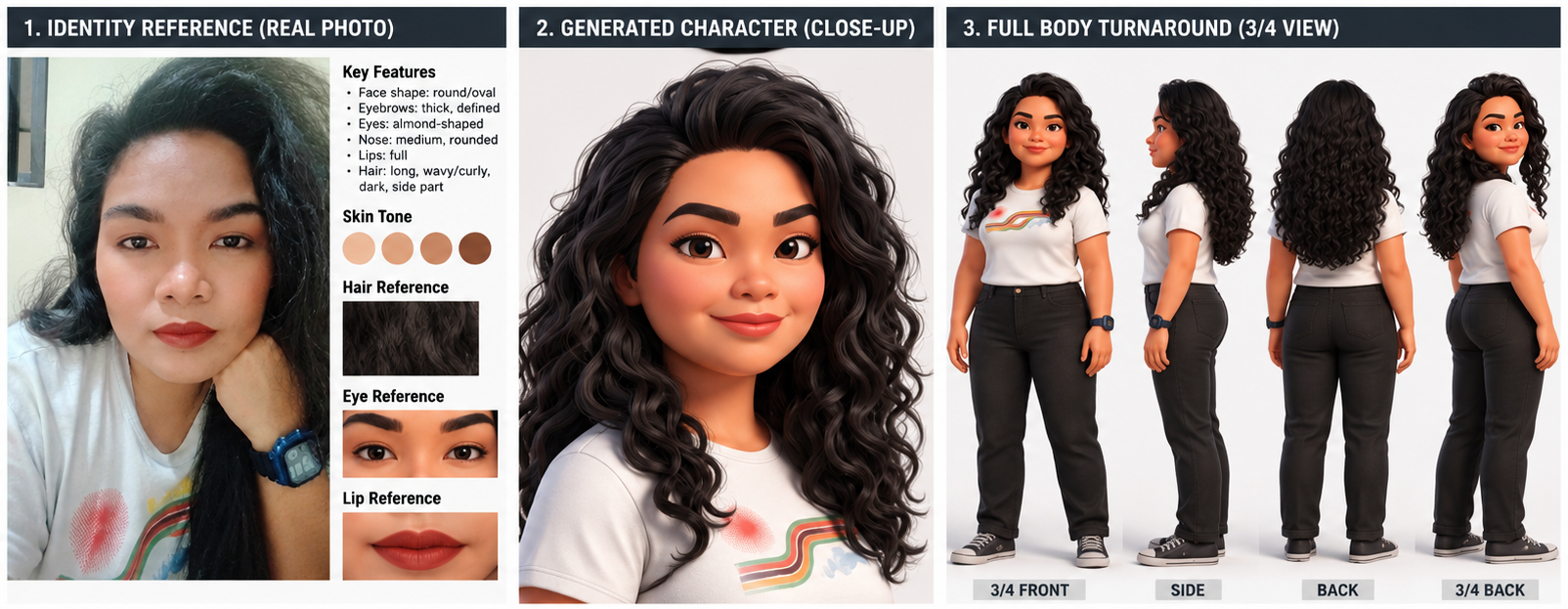
The character generation board, with the reference photo beside the generated character close-up and the full-body turnaround.
Multi-scene video with Seedance 2.5
Settings: Seedance 2.5 for 15 seconds (3 × 5-second clips) at 720p; generation took approximately 4 minutes each for the first two clips and 5 minutes 33 seconds for the third, with 267 credits for each clip and 2 for joining them.
The test asked whether a saved character would stay the same across three connected scenes. It also checked for smooth movement and realistic environmental sound with continuous camera tracking.
Toa, a saved character, kept the same face and hairstyle across all three clips, with a consistent overall appearance. Character movement was smooth, and environmental sounds were realistic and synchronised with the scenes. Creative Claw itself says character references guide consistency but do not guarantee it, and that a character's face and outfit can still drift.
Scene continuity was the weak point: the individual clips were convincing, but joining them produced visible transitions instead of one continuous camera move. The closing gesture, meant to attract a waiter's attention, looked more like a friendly wave.
Verdict: in this test, effective for keeping a character's identity and making individual scenes, but a polished multi-scene video needs careful shot planning and extra editing.
Lip sync with HeyGen Avatar 4
Settings: 720p widescreen for a 3-second video; 73 credits in total: 2 credits for speech generation and 71 credits for the lip-sync video.
The test combined the saved character Toa with a saved voice clone, delivering a welcome line against a plain white background.
The avatar model produced convincing facial animation: natural eyebrow raises and occasional blinking, with well-executed lip movements. Subtle body movements added realism and prevented the character from appearing static.
Verdict: reusing an existing character and voice clone simplified the creation process, and the result was strong for a short talking-avatar video; the 71-credit video cost is worth considering for longer projects.
Privacy: your photos and voice samples
Creative Claw's Privacy Policy, last updated on October 7, 2026, also applies when you use Creative Claw through an AI assistant such as ChatGPT.
In that case, Creative Claw says it receives what the assistant passes to its tools, such as the prompt and settings. It says it also receives assistant-assigned account and session identifiers, plus your language, country and time zone.
Creative Claw says photos you upload to create a Character are sent to the AI model providers the job needs, stored as ordinary uploaded media and can be deleted at any time. Its developer documentation, though, describes ordinary asset deletion as a soft delete that hides an asset from search while preserving the underlying file.
Creative Claw also says anyone holding a shareable link to ordinary media may be able to open it.
Creative Claw says voice samples go through a separate flow that does not use public file links. They are kept until you delete them or their Character. It also says it does not use voice samples or clones to train its own general-purpose AI models.
Creative Claw says each voice provider's retention, safety processing, service improvement and model-training practices depend on that provider's agreement and the settings of the provider account Creative Claw uses. Creative Claw's Privacy Policy also tells you not to assume that settings on your personal voice-provider account apply to its integration.
Creative Claw says each voice provider stores its clone in Creative Claw's provider account, which serves multiple customer workspaces. If you later select another supported provider's speech model, Creative Claw says it may use the retained private sample and existing consent record to create that provider's copy of the voice.
You can delete a Character together with its cloned voice, the vendor says. Creative Claw says deleting the associated Character revokes access and requests deletion of its provider clones and private samples. Deleting a clone does not recall speech already generated, downloaded or shared.
Creative Claw says deleting a voice clone does not delete data controlled by the platform where the user originally supplied the recording. Deleting a voice sample alone does not delete the provider-hosted clone. Creative Claw says deletion through a provider may not immediately erase every provider backup.
Creative Claw pricing and credits
Creative Claw's one-time credit packs start at $10 for 1,000 credits, checked on 18 October 2026. A subscription is not required, which can suit occasional projects without a recurring payment.
That is an entry cost, not a fixed price for a finished video. How far the credits go depends on the models and settings you choose, plus any retries.
In written confirmation to Tekanology, Creative Claw said optional subscriptions add purchase discounts, more cloned-voice slots and collaboration features.
New accounts receive 100 credits free on signup, and no card is required. Purchased credits do not expire.
A ChatGPT subscription does not include Creative Claw credits, which are billed separately. Creative Claw says the same credit balance also works in Codex and Claude.
Credits are deducted before each generation starts, the vendor says. It says estimates are free and read-only, and the final cost is confirmed when a generation finishes. It also says it may change pricing going forward, with reasonable notice.
Seedance 2.5 is listed at 24 to 131 credits per second depending on resolution, with 5 seconds costing 119, 267 or 657 credits. Each of our 720p multi-scene clips used 267 credits.
In our testing, image and audio generation was particularly affordable, while video generation was considerably more expensive, especially for multiple scenes or higher-end models. Some inexpensive generations produced convincing results, but costlier video projects occasionally needed further editing or missed important creative instructions.
Verdict: if you produce complex videos, budget for revisions; in our testing, a higher credit cost did not necessarily guarantee better results.
Commercial use
Creative Claw permits generated output to be used for commercial purposes, subject to its Terms. The vendor does not claim ownership of generated output. It says you keep ownership of your inputs.
Creative Claw does not guarantee that output is unique, original, accurate or non-infringing. Creative Claw makes you responsible for intellectual-property, publicity-right and other legal compliance in what you submit and generate.
Voice cloning needs your own voice or the speaker's explicit, informed permission. Photos of another person should be uploaded only with that person's permission. Check Creative Claw's terms before you publish commercial work.
Refunds and failed generations
Payments for used Creative Claw credits are generally non-refundable except where law or applicable purchase terms require otherwise. Creative Claw may, at its discretion, refund unused purchased credits to the original payment method.
- When an operation fails because of a technical error and no valid output is delivered, the credits charged for it are returned.
- A completed operation remains charged even when its output does not match the prompt, preserve a likeness or meet a creative preference.
- Free, promotional and goodwill credits are not redeemable for cash.
That second point matters in practice. A completed result can still miss the brief, as our sound-effects test did.
Limitations and reliability
On the platform side, the image-display problem made image generation less convenient than expected, and its exact cause remains unconfirmed. What worked was going to Creative Claw directly: its credit balance and generation history confirmed which images it had actually generated, and its direct image link opened the finished image.
Several outputs struggled with precise details or missed the requested timing. For a cohesive multi-scene video, plan and edit each clip more deliberately, particularly its opening and closing frames. Check every completed output before you rely on it.
Pros and cons
Strengths
- Multiple AI models through a single interface, its greatest advantage in our testing.
- An approval step that showed the estimated cost and settings, with an editable prompt, before our videos ran.
- ElevenLabs v4 speech with accurate pronunciation, natural pacing and convincing emotional expression.
- A stylised character from one personal photo that kept recognisable facial features and the hairstyle.
- A reusable-character feature that maintained Toa's identity across multiple scenes.
- Lip sync with natural eyebrow raises and well-executed lip movements.
Weaknesses
- Inconsistent plugin activation and unexpected model selection weakened the overall experience.
- In our multi-scene test, the clips joined with visible transitions rather than one continuous camera move.
- Our voice clone was less reliable when expressive delivery was required.
- The account we tested allowed only one saved voice-clone slot.
- Music was unreliable for precise instrument sequencing in our test.
FAQ
How much does Creative Claw cost?
You can buy Creative Claw credit packs without a subscription. In written confirmation to Tekanology, Creative Claw said optional subscriptions add purchase discounts, more cloned-voice slots and collaboration features. Creative Claw says the exact credit cost is shown in every response and in its media viewer.
Is Creative Claw free?
New Creative Claw accounts receive 100 credits free on signup, and no card is required. A ChatGPT subscription does not include Creative Claw credits.
Can you use Creative Claw for commercial work?
Creative Claw permits generated output to be used for commercial purposes, subject to its Terms. It does not guarantee that output is unique, original, accurate or non-infringing.
Do Creative Claw credits expire?
Purchased Creative Claw credits do not expire. Creative Claw may, at its discretion, refund unused purchased credits to the original payment method.
Does Creative Claw refund failed generations?
When an operation fails because of a technical error and no valid output is delivered, the credits charged for it are returned. A completed operation remains charged even when its output does not match the prompt.
The verdict: good overall, but highly dependent on the task
Recommended, with conditions. Creative Claw suits you if you want a saved character and voice clone you can reuse in short talking-avatar clips: reusing them simplified our 3-second test, where it performed strongly. It also performed well for photo-based character generation in our test. Our speech test also showed potential for business announcements and commercial voiceovers.
Our recommendation comes with conditions because, in our testing, inconsistent prompt adherence, lengthy generation times and difficulty maintaining continuity across multi-scene projects limited Creative Claw's overall reliability, and results often needed extra editing before they looked professional. Budget for that work.
Our one ad test would work better as an animated storyboard or promotional concept than as a publication-ready video ad. If a publication-ready ad is what you need, look elsewhere.
Our tester's final score was 7.72 out of 10. The rating given with this review is Tekanology's own conversion of that score: halved, then rounded to one decimal place.
For creators testing multiple AI models or producing videos regularly, the approval step is particularly valuable: being able to identify mistakes and refine instructions, then confirm costs before approving generation, reduces wasted credits. Check what actually ran: confirm the provider and model, then check the credit charge and the finished output.
Specialist tools: where exact timing or a finished film matters, plan for work beyond one generation. For precise sound cues, that means placing them yourself in an audio editor.
Creative Claw itself says assembling a Film does not supply every transition automatically. It also says a 15-second product ad can need several generation and editing operations rather than one generation call.
Your next step: start with short, low-cost tests before committing to an expensive production, using your signup credits. For video, check the estimate first: both generations in our easy video test were priced at 190 credits.
Hands-on testing
Tested by Tekanology on 9 to 16 October 2026.
In the reviewer's words: "Some results were genuinely impressive, particularly its ability to maintain character identity and produce expressive talking avatars."
Pricing: the prices in our table were last checked against the vendor's pricing page on 2026-10-01, more than 14 days ago, so no price is stated here.
Disclosure: Creative Claw gave Tekanology free credits to run these tests. Creative Claw had no editorial control over this review.