
Magic Hour Review: Can One AI Platform Really Do It All?
A hands-on Magic Hour review comparing image, video, audio and character tools, with real test results, credit costs and trade-offs before you subscribe.

Disclosure: Magic Hour gave Tekanology free Pro access and testing credits. Full details are at the end of this review.
A beautiful AI image can still be the wrong image. In a Magic Hour editing sequence, the scene looked polished, but the shoulder bag ended up in the wrong place and the requested open umbrella came out closed. This review looks for that gap tool by tool.
An all-in-one AI creative platform, Magic Hour brings content generation and editing tools, plus finishing tools, into a single workspace. Its maker says the browser product contains more than 100 creative tools. We tested a selection of them with our own prompts and settings, and scored the results ourselves.
The short version
- Best for: creators, marketers, social-media teams and small businesses who regularly work across images, video and audio. Beginners can start on the Free plan, although the number of tools and models can feel overwhelming at first.
- Less ideal for: specialists who only need one particular capability and may get deeper controls or more predictable pricing from a dedicated platform. If you mostly generate premium video, watch credit consumption closely.
- Price: Magic Hour's Creator plan is USD $144 billed yearly, equivalent to $12 per month.
- Free plan: you start with 400 signup credits plus limited daily credit claims. It needs no credit card. It has no general commercial-use entitlement.
- Images: GPT Image 2 led our image accuracy test at 96%, narrowly ahead of Nano Banana 2 at 94%.
- Video: Seedance scored 9.72/10 on our difficult video scene but took 5 minutes 6 seconds, while LTX finished in 41 seconds with 8.33/10.
- Top marks: Video-to-Audio scored 10/10 in 11 seconds.
- Weak spot: AI Sound Effect Generation scored 2/10.
How Magic Hour was tested
At the time of testing, supported models came from families including Kling, Veo, Sora, Seedance, LTX, MiniMax, FLUX, GPT Image, Nano Banana and Seedream. The tests covered:
- Stacked prompt: instructions added in stages to a single image.
- Image comparison: GPT Image 2, Nano Banana 2, Seedream 4 and a multi-model batch, all given the same reference image and prompt.
- Video: a 6-second apple pickup and a 10-second café scene at 1080p, each generated with Kling, LTX and Seedance.
- Audio: Voice Generator, AI Sound Effect Generation and AI Music Generator.
- Sound for existing video: Video-to-Audio added matching sound to a clip.
- Faces and characters: Face Swap Photo, Talking Photo, Lip Sync and Character Replace.
How to read the scores: scores are our own assessment of the outputs we generated, not official Magic Hour scores or standardised benchmarks. Individual users may experience different results. Another reviewer could reasonably score the same outputs differently.
Tekanology's testing methodology explains the wider method.
Getting started: easy to enter, harder to master
Getting started with Magic Hour was quick and beginner-friendly. Signup on Magic Hour includes questions on how you intend to use the platform and which tools interest you. The workspace and recommended tools remained the same during our testing, regardless of the preferences we chose.
The questions add little friction, but they currently feel more like preference collection than functional personalisation. Using the answers to prioritise relevant tools or offer goal-based starting workflows would make onboarding considerably more useful.
The interface has a modern look, with a dark theme and purple accents. Quick-start options and Popular Tools gave us obvious places to begin, while search with category filters made it easy to find a specific tool.
With more than 100 tools available, browsing the catalogue requires considerable scrolling, particularly on mobile. Similar tool names can also be hard for inexperienced users to tell apart. Face Swap, Lip Sync, Talking Photo and Character Replace may not be immediately distinguishable to inexperienced users.
On a phone, the cards stay touch-friendly and the two-column tool directory makes good use of the smaller screen. The interface's descriptions and smaller elements can be harder to read on small displays. The prompt window for creating or editing blocked most of the screen in the mobile version we tested.
In the image editor, the Edit tab in the top menu starts a new project from an uploaded photo, while the Edit button under a generated image sends that image back to the prompt box so you can keep refining it.
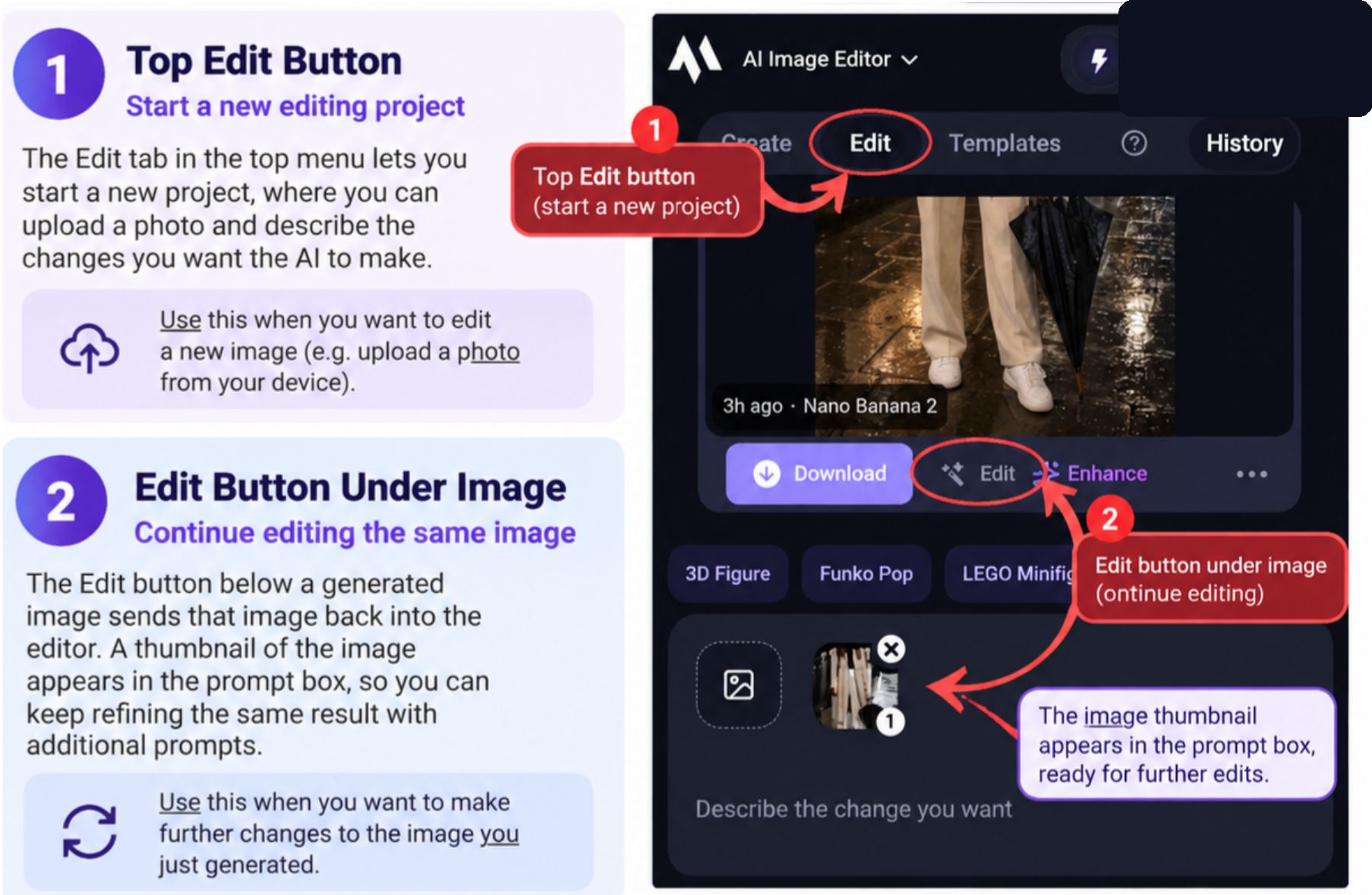
The editor's starting and continuing controls. Private workspace details are redacted. Open the image for the full-size view.
Beginner tips
- Click # to set how many images each run creates, up to a maximum of four.
- On the free plan you can run up to five models at the same time, and on a premium plan you can run every available model at once. The multi-model batch in the comparison below scored 75%, below each single model.
- After your first edit, Magic Hour shows no blank start page. Click Create in the top bar to start a new blank project.
- During testing, the recommended model was the cheapest option for image edits and still gave a good result; switch models if you prefer another.
Takeaway: the interface's greatest strength, having so many tools readily accessible, is also its biggest weakness.
A Favourites section and a list of recently used tools would save time on repeat visits.
Verdict: easy to enter, but harder to master. Experienced users will find it powerful and efficient once they know what they are looking for.
Image generation: strong visuals, weaker detail retention
Stacked-prompt test: do earlier details survive?
The stacked-prompt test built an image of an older woman looking up at the rain at night, adding instructions in stages; the last stage also asked for every earlier detail to stay as it was.
| Criterion | Result |
|---|---|
| Visual quality | Very strong |
| Generation speed | Very good, about 30 seconds |
| General prompt understanding | Strong |
| Precise object placement | Mixed |
| Fine-detail accuracy | Mixed |
| Stacked-prompt retention | Weak to moderate |
The test's first noticeable error appeared around the third stacked prompt, when the black shoulder bag was placed on her right shoulder instead of her left.
From about the fourth prompt onward, the results showed new instructions sometimes replacing earlier details rather than being added to them. For example, the test dropped the requested impression of speeding cars once the scene was changed into a busy street, and pedestrians largely replaced it.
The full stacked prompt is in the screenshot below, beside the results sheet. We scored each requirement against the final image:
- Older woman looking up at the rain at night: pass.
- Brown pleated jacket: pass.
- Buttons above the belt: partial, because the requested number of undone buttons was not clearly reproduced.
- Black shoulder bag on her left shoulder: fail, because the bag sits on her right shoulder.
- Paper coffee cup in her right hand: pass.
- Open umbrella in her left hand pointing to the ground: partial, because the umbrella appears closed.
- Woman in the middle of a busy street: partial, because she stands closer to the pavement than the middle of the road.
- Coffee shop behind her: pass.
- Large coffee logo on the glass window: pass.
- Mirage of speeding cars: fail, because the effect disappeared from the final image.
- Wet ground reflecting the store lights: pass.
- Silhouettes of busy people moving quickly: partial, because the sense of fast movement is limited.
- No additional people carrying umbrellas: fail, because several background pedestrians carry umbrellas.
- Every earlier detail to stay as it was: fail, because earlier details were lost or repositioned as later instructions were added.
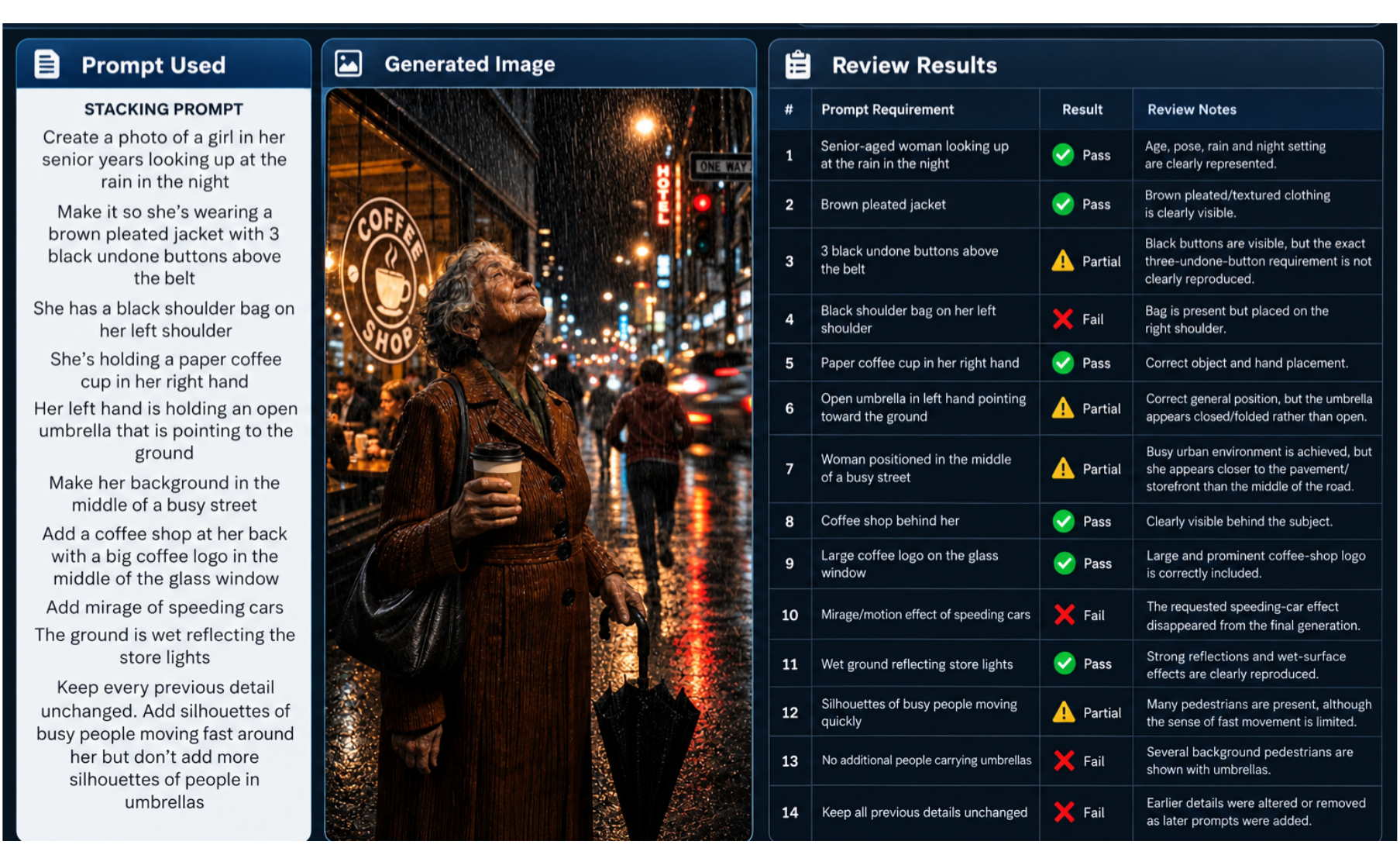
The stacked-prompt results show why a polished final image still needs checking against the original brief.
Verdict: strong visual generation, but inconsistent detail retention during complex stacked prompting. For normal image generation the result is strong, but for work that needs strict consistency across repeated edits, check each generation rather than assuming earlier details survived.
Image model accuracy: GPT Image 2 vs Nano Banana 2 vs Seedream 4
The accuracy test gave every route the same reference image and prompt. Each result was scored on how accurately it followed the individual instructions while preserving the original subject. See the top of the comparison sheet below for the full prompt.
| Image route | Score |
|---|---|
| GPT Image 2 | 96% |
| Nano Banana 2 | 94% |
| Seedream 4 | 90% |
| Five-model batch | 75% |
GPT Image 2 gave our strongest overall result, at 96%. That result delivered the best balance of prompt accuracy and realistic lighting as well as atmosphere and composition. Nano Banana 2 was a very close runner-up, matching most of the requested details but performing slightly weaker with the rainy night-time atmosphere.
Running several models at once scored lower than any single model, at 75%. Combining a fast model with best-quality ones did not make generation faster, and multi-model runs also tended to make more errors in placement and prompt following. The multi-model result was not worth the credits it cost.
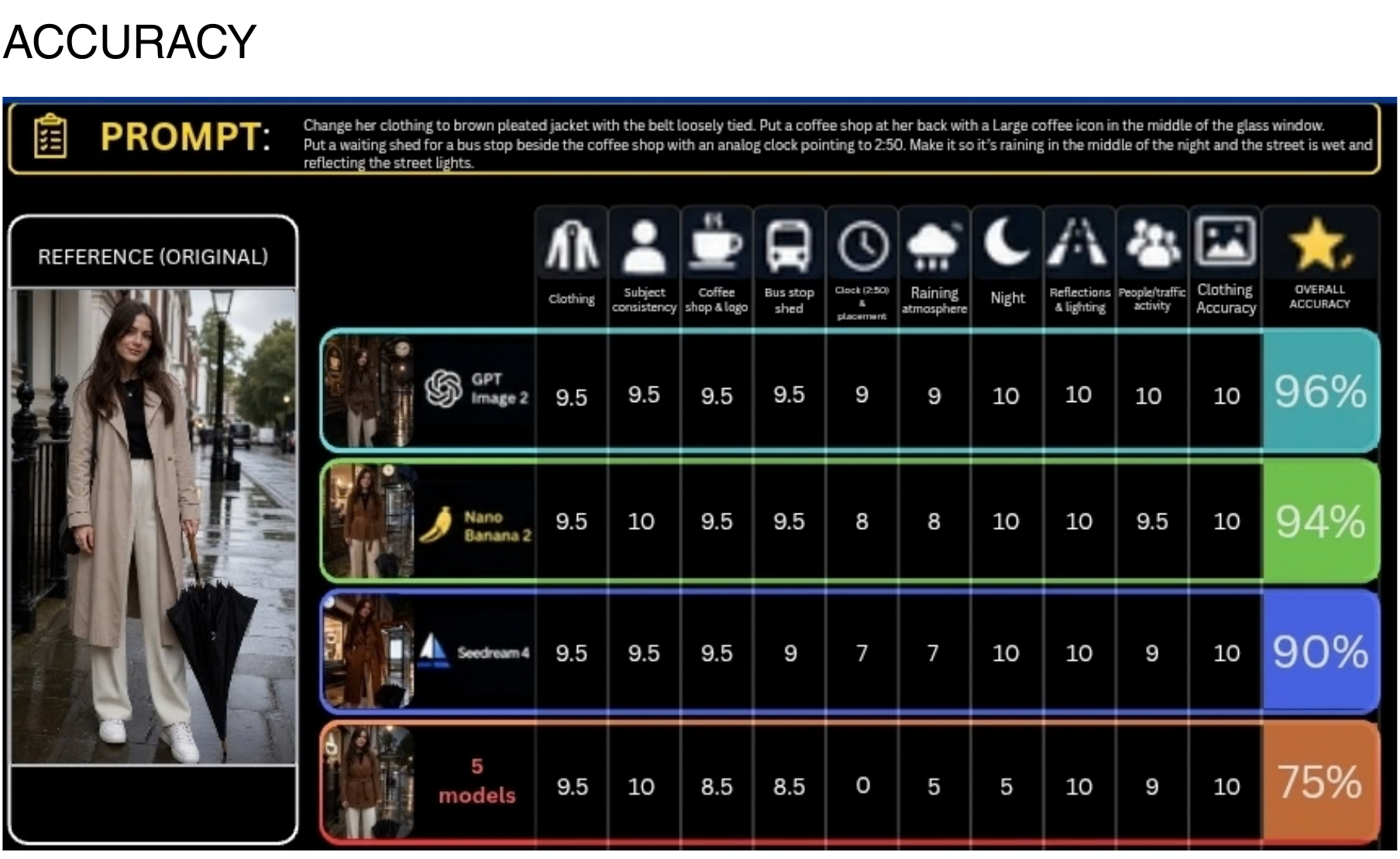
The underlying comparison sheet; select it for the full-size view.
Verdict: GPT Image 2 scored highest in this single shared-prompt comparison.
Video generation: Kling vs LTX vs Seedance
Easy test: a six-second apple pickup
Settings: 1080p, 6 seconds, single shot, stationary camera.
The task: the test required an apple to remain on a wooden table until a hand entered from the right to pick it up and carry it out of frame.
All three models handled the easy test extremely well, achieving full marks across the core visual criteria.
| Model | Generation time | What happened |
|---|---|---|
| LTX (fastest and lower-cost) | 29 seconds | Slight pumpkin-like segmentation appeared on the apple |
| Kling (Magic Hour recommended) | 1 minute 55 seconds | Reliable and accurate result |
| Seedance (best quality) | 3 minutes 29 seconds | Best overall visual quality, but inaccurate biting-like audio while the apple was only rotated |
What it means: identical scores across the core visual criteria hid real differences, and generation times ranged from 29 seconds to 3 minutes 29 seconds.
Difficult test: a ten-second café scene
Settings: 1080p, 10 seconds, one continuous shot with a slowly moving camera.
Full prompt:
Generate a 10-second continuous photorealistic shot inside a small café. A waiter wearing a white shirt carries two coffee cups toward a table where exactly two customers are seated. He places the first cup in front of the woman on the left, then places the second cup in front of the man on the right. The woman picks up her cup with her right hand while the man remains seated and does not touch his cup. During this sequence, a person wearing a red coat walks past the café window outside from left to right. The camera slowly moves forward throughout the shot without cutting. Maintain exactly two cups, consistent faces, consistent clothing, realistic hand interaction, physically believable liquid behaviour and correct object permanence. No cuts or transitions.
| Model | Generation time | Score |
|---|---|---|
| Seedance | 5 minutes 6 seconds | 9.72/10 |
| Kling | 3 minutes | 9.44/10 |
| LTX | 41 seconds | 8.33/10 |
All three models followed the overall event sequence well, but their performance differed considerably once the prompt required several characters and object interactions together with simultaneous events and controlled camera movement.
- Seedance: handled the cups by their saucers, but the red-coated passer-by never appeared and a red delivery truck showed up instead.
- Kling: followed the sequence, but the waiter held the cup incorrectly and the man touched his cup.
- LTX: introduced a third cup that appeared and disappeared, and its cups differed in size. LTX also added extra people in red coats instead of the one passer-by, and its waiter sat down.
Even the highest-scoring result was not a literal fulfilment of the brief.
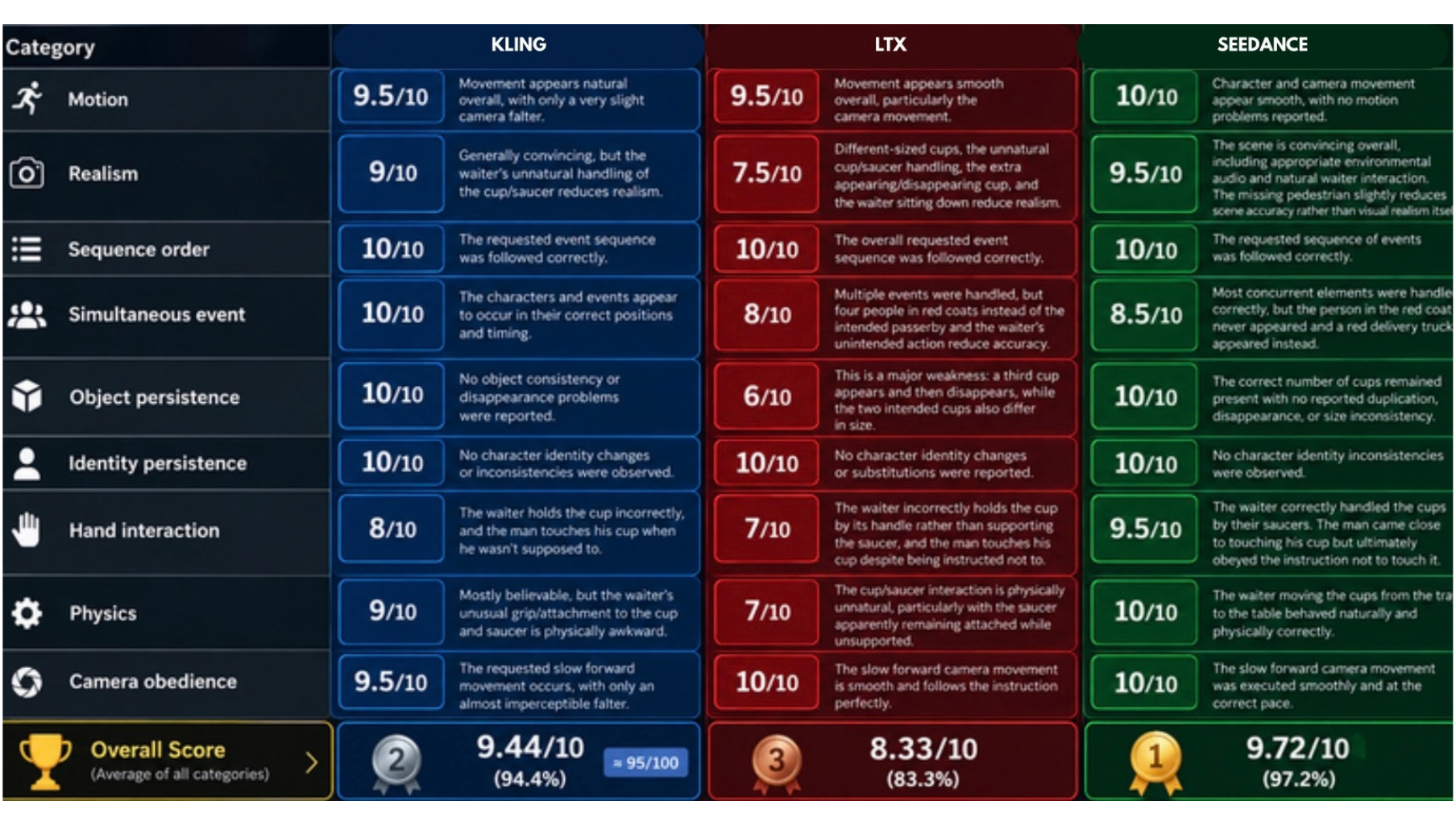
Open the full-size sheet for the detailed criteria.
Our take: LTX traded some quality for speed and lower cost, while Seedance traded speed for higher quality; Kling sat in between with balanced performance. That trade-off reflects these tests, not universal model rankings.
Audio: judge the tool, not the category
Voice Generator: 6/10
The script: a narrator says that Dr Elena Rodríguez arrived at Gate B17 at exactly 2:50 p.m.; she whispers a line containing a dollar amount, pauses briefly, then calls out excitedly to James.
Generation was fast at 16 seconds, and pronunciation was clear and understandable. The selected Narration tone was recognisable, and the voice remained consistent throughout.
Accuracy and expressiveness were weaker: the script's $1,247.83 became $147.83, the requested pause was ignored, and the excitement was missed, leaving the delivery monotone. The generator also produced little tonal difference between narration and dialogue.
A voice can sound clear while changing the message, so check any recording that contains prices against the script before you use it.
The Voice Generator offers 37 countries or languages. Accents and speaking speeds can be adjusted too, and there are tone categories and celebrity-labelled voice options to pick from. The celebrity-labelled voice we selected did not sound like the singer it was named after.
Verdict: the result sounded monotone, despite being clear and technically consistent.
AI Sound Effect Generation: 2/10
The sound-effect prompt:
Inside a busy café during heavy rain: quiet conversations and dishes in the background. A ceramic cup is placed onto a saucer, a spoon stirs the coffee three times, a chair slides backward, then the café door opens and a bicycle bell can briefly be heard outside. No music.
Most of the requested sounds were missing or inaccurate. Because these sounds were not generated as instructed, the output did not follow the requested sequence and timing, and its handling of simultaneous sounds was also very poor. The requested rain was rendered as an extremely loud, radio-like static noise that overwhelmed the other audio.
Spatial consistency in the output was also poor, as the generated sounds did not create a convincing sense that the different audio sources were naturally positioned within the same café.
Verdict: a poor result, despite the relatively quick 34 seconds. Check its output carefully before you rely on it for a precisely timed soundscape.
AI Music Generator: 9/10
The music prompt:
Create an upbeat cinematic pop track beginning with soft piano and female vocals. Introduce drums after the first section, followed by strings and bass. Build gradually into an energetic chorus, then finish with piano alone. Do not use electric guitar.
| Track length | Queue time | Generation time | Tokens used |
|---|---|---|---|
| 15 seconds | 51 seconds | 31 seconds | 15 |
| 2 minutes | 56 seconds | 48 seconds | 120 |
Queueing and generation are separate waits, so count both when you plan a session.
The AI Music Generator delivered excellent audio quality and composition. Its rhythm and timing were excellent too. The generator avoided electric guitar as instructed, and the chorus was clearly identifiable. However, the chorus lacked some of the requested energy, and the track did not finish with piano alone.
The costs in the table above are in tokens, the unit the reviewer's test notes record for the music tests. This review keeps that term and does not convert tokens into credits.
Verdict: despite those instruction misses, the finished music was recommendable and realistically usable, making Music Generation one of the stronger audio capabilities in this test.
Video-to-Audio: 10/10
The Video-to-Audio prompt:
Footsteps on wooden flooring, keys landing on the table, water pouring into a glass, one distant dog bark outside, and the wooden door closing. Natural indoor room ambience. No dialogue. No music.
Generation took just 11 seconds, and the result was excellent: the tool correctly generated the requested sounds and followed both the prompt and the events shown in the video.
Almost all incorporated sounds were realistic and properly synchronised with the corresponding on-screen movements. Sequence accuracy, sound persistence, simultaneous-event handling and audio clarity all scored 10/10, with no unwanted dialogue, music or other audio detected.
Verdict: excellent realism and synchronisation, with one of the fastest generation times in the audio tests.
Face and character tools
Face Swap Photo
The Face Swap Photo test was demanding: a cross-character swap involving substantially different facial proportions as well as a different skin colour and texture. The tool handled the transfer of the source face's recognisable characteristics well, particularly the eyes and eyebrows and the upper facial structure. It also impressively preserved the target's green skin and head shape.
The result's colour and lighting integration were generally convincing, but blending and realism were the main weaknesses: the swapped eye region appeared smoother and more photographic than the surrounding textured character face, which created visible transitions. The lower-face transfer was also weaker, which reduced realism.
Verdict: despite these artifacts, the successful transfer of key features was particularly noteworthy in such a demanding cross-character test.
Talking Photo
Settings: 480p · 15 seconds · 360 credits · Generation time: 47 seconds
Overall, Talking Photo performed well, with good phoneme-to-mouth accuracy and only a few noticeable discrepancies, while correctly handling pauses and words requiring exaggerated mouth movements. Talking Photo's synchronisation was particularly impressive because the tool distinguished the main vocal from the backing vocals and did not lip-sync to the background singing. Appropriate facial movement also appeared automatically, without additional prompting.
The result still looked AI-generated, with only average overall believability. Users can preview preset audio, select preset celebrity-labelled options and control video duration and resolution, but credit consumption can be substantial.
Lip Sync
Generation time: 3 minutes 18 seconds
Lip Sync performed well overall, producing convincing phoneme-to-mouth synchronisation and natural facial movement when the subject remained clearly visible. It handled difficult words and pauses without noticeable problems, but significant movement of the head or face could reduce synchronisation and realism; for example, the character continued lip-syncing while sneezing. Background characters also reduced consistency.
Footage for Lip Sync does not need to match the chosen audio already. One front-facing subject with minimal head and facial movement gave the most reliable results. In a busy scene, check every face, including background characters.
Character Replace
Character Replace frequently returned an "Unsupported Video Format" error. The tool's error message only said to change the browser or use a different file format.
When contacted, Magic Hour's support explained that there is no specified video format, but there are file limits that depend on the selected tool and model, and on the plan. Shortening the free-tier source videos to 6 and 10 seconds allowed the tests to proceed.
Short clip: 480p · 6 seconds · queued 1 minute 5 seconds · generated in 4 minutes 10 seconds
The tool replaced the original person with the anime-style character while keeping the original scene and pose, as well as the positioning and mirror reflection, mostly consistent. It kept key features from the reference, such as the long black hair and glasses as well as the white outfit, although it did not reproduce the outfit and body proportions exactly.
The replacement character in the output failed to capture the original character's mouth movements, which significantly reduces realism during speech. Overall, the tool performed well at general character replacement and scene consistency, but lip movement, exact character fidelity and realistic integration still need improvement.
Longer clip with several characters: 480p · 10 seconds · queued 5 minutes 34 seconds · generated in 3 minutes 41 seconds
While the first test produced an average-to-good result, the second test struggled significantly. It failed to keep the new character's face consistent, briefly blending the source and replacement characters' faces, and it mixed their clothing. The result also looked unnatural.
Verdict: we strongly recommend avoiding source videos with several characters when you only want to replace one. Simpler videos with a single character, in a visual style similar to the replacement character, are likely to produce more consistent results.
Magic Hour pricing: flexible credits, expensive premium retries
The table below shows each paid plan's USD price when billed yearly. The entire annual amount is charged at checkout rather than monthly. Taxes are excluded from the advertised price and may be added at payment.
The pricing page can show regional currencies, so check the currency and the total for your billing interval before purchasing. AI info page · Pricing page
| Plan | USD price, billed yearly | Credits a year |
|---|---|---|
| Free | $0 | 400 signup credits plus limited daily claims |
| Creator | $144 a year ($12 a month equivalent) | 144,000 |
| Pro | $300 a year ($25 a month equivalent) | 300,000 |
| Business | $792 a year ($66 a month equivalent) | 840,000 |
The Free plan is genuinely useful for testing because it requires no credit card and provides starter credits.
Its restrictions are meaningful, though: lower maximum resolution, restricted premium-model access, no general commercial-use entitlement, and video or audio outputs that may contain watermarks.
Creator is the cheapest subscription tier and represents the biggest functional upgrade, opening the complete tool library along with commercial-use rights and watermark-free exports. Pro and Business expand its limits further rather than fundamentally changing what the platform can do.
On annual billing, Creator lists up to 1.7 hours of video, Pro up to 3.5 hours and Business up to 9.7 hours. These estimates are examples rather than guaranteed output. Actual credit consumption can change with the model and resolution, and with the duration and tool you use.
Prepaid subscription and credit-pack credits do not expire, including after a subscription ends. When the allowance runs out, Magic Hour does not appear to charge automatic overages; you can wait for the next billing cycle, buy a one-time credit pack or change plans.
Credit packs are one-time prepaid top-ups that do not create a recurring subscription. Credits and feature access are separate, though: a credit pack does not unlock subscription-only models, resolutions, upload limits or concurrency.
Pricing transparency is one of Magic Hour's strongest areas. During testing, the editor displayed an estimated credit cost before generation and updated it whenever a setting such as the model or resolution changed. That matters on a multi-model platform, where two generations of apparently similar content can have dramatically different credit costs. The platform's credit system is strong and unusually controllable.
Lower-cost models were still capable of producing highly usable results, which makes model selection particularly valuable for experimentation and routine production.
Premium models can provide better quality or prompt adherence, but their substantially greater credit consumption can become expensive when generating longer videos or repeatedly experimenting. Images remain comparatively economical to experiment with, while premium video generation can consume credits much more aggressively. Narrowing the credit gap between economical and premium video models would strengthen the value for frequent creators.
Test the exact workflow you expect to use and note its credit estimate, then judge the cost against the outputs you would actually keep.
Commercial use
Paid subscriptions and credit packs include commercial-use rights. Usage-based billing is also available; it currently needs setup assistance and is not self-serve. Check the terms for which paid arrangements carry commercial-use rights and on what conditions.
Before you upload a real person's face or voice, make sure you have their permission. Terms of Service
Customers retain ownership of their prompts and uploads and, subject to the Terms and applicable law, own the assets they create. Generated assets may not be unique, and different users may receive the same or similar outputs.
Cancellation and refunds
Subscriptions can be cancelled from the plan page in your account. Cancellation normally takes effect at the end of the current billing period, with paid benefits remaining active until then.
Refund eligibility is limited:
- Subscriptions and renewals: they qualify within seven days of payment if fewer than 400 credits have been used since that payment.
- Credit packs: they qualify within seven days if none of that pack's credits have been used.
- Limits: the policy generally limits customers to one approved refund, excluding duplicate charges and refunds required by law.
Limitations and reliability
| Area | Rating |
|---|---|
| Platform: frequency of problems | Low |
| Platform: impact on normal use | Low |
| Outputs: severity of limitations | Low to moderate |
| Outputs: consistency | Inconsistent between tools and models |
| Workarounds | Good |
| Transparency about limitations | Good, particularly on cost |
The platform itself held up: one system freeze occurred during testing and a refresh resolved it, and occasional queueing was generally a minor delay. That freeze may have been related to the internet connection rather than Magic Hour itself. The longer Character Replace clip queued for 5 minutes 34 seconds.
The more significant issue is inconsistent output quality between individual tools and models, which can require additional generations and therefore consume more credits. Certain tools produced weaker results, particularly Sound Effect Generation and some aspects of Voice Generation, but the core platform remained usable. Check every output before you rely on it.
The credit estimate shown before generation makes the cost visible before you commit. The platform's output quality and instruction adherence can still vary considerably between tools and models.
Pros and cons
Strengths
- More than 100 creative tools in one browser workspace.
- Model choice lets you balance quality against credit consumption.
- Strong image and video results in the tested scenes.
- Music Generation scored 9/10 and Video-to-Audio 10/10.
- Credit estimates are shown before you generate.
- A Free plan with no credit card required.
- Touch-friendly cards and a two-column tool directory on mobile.
Weaknesses
- Output quality is inconsistent between tools and models.
- Complex image edits can overwrite or remove earlier requirements.
- The Voice Generator misread a spoken price and missed delivery cues.
- Sound Effect Generation scored 2/10.
- Premium models can become expensive when generating longer videos or repeatedly experimenting.
- The large catalogue and similar tool names can overwhelm newcomers.
- The prompt window covers most of the mobile screen.
FAQ
Is Magic Hour worth it?
It depends on which tools you need. Video-to-Audio scored 10/10. AI Sound Effect Generation scored 2/10. If you plan to rely on premium video models, budget for their credit costs before you subscribe.
How much does Magic Hour cost?
The Creator plan is USD $144 billed yearly, equivalent to $12 per month. Pro is USD $300 billed yearly, equivalent to $25 per month, and Business is USD $792 billed yearly, equivalent to $66 per month. The full yearly amount is charged at checkout. Taxes are excluded from the advertised price and may be added at payment.
Is Magic Hour free?
Yes, there is a Free plan, and it needs no credit card. It starts with 400 signup credits plus limited daily credit claims. Selected core tools can also be tested before you create an account on Magic Hour. Premium-model access and maximum resolution are restricted on the Free plan, and there is no general commercial-use entitlement.
Can you use Magic Hour for commercial work?
Yes: paid subscriptions and credit packs include commercial-use rights. Usage-based billing is also available; it currently needs setup assistance and is not self-serve. Check Magic Hour's terms for which paid arrangements carry commercial-use rights and on what conditions. Free accounts have meaningful restrictions, including no general commercial-use entitlement.
Do Magic Hour credits expire?
No: prepaid subscription and credit-pack credits never expire, including after a subscription ends. Remaining credits are kept on the account, but they do not keep subscription-only features once the paid plan ends.
The verdict: choose it for the range, then choose the tools carefully
Recommended, with conditions. The platform earns a recommendation for creators and marketers who need several kinds of media in one place, and for social-media teams and small businesses with the same need. It is also a good choice for beginners, because it offers a Free plan and a relatively approachable interface. With a paid plan, it is suitable for commercial content production, as paid plans include commercial-use rights.
Specialists who need only one capability should look at a dedicated platform instead. If your work depends on premium video models, budget for their credit costs before you commit.
Results varied between tools within the same category: in audio alone, Video-to-Audio scored 10/10 and AI Sound Effect Generation scored 2/10. Elsewhere, the Voice Generator changed a spoken price, and stacked image edits lost earlier details.
One front-facing subject gave Lip Sync its most reliable results, and Character Replace did better with one character than with several. Treat the catalogue as a set of tools to test, rather than a list of guaranteed outcomes.
Your next step: start on the Free plan, which needs no credit card, and run one real brief from your own work before you pay for a plan.
Hands-on testing
Tested by Tekanology in September 2026. Evidence on file: 35 recorded observations and 4 approved screenshots.
In the reviewer's words: "Overall, an impressively capable all-in-one creative platform whose breadth, model choice and flexibility are its biggest strengths, but whose uneven performance between tools and potentially high premium-generation costs prevent it from being equally strong in every area."
Pricing: the vendor's pricing page (checked 2026-10-01) lists Free: $0; Creator: USD $12/month equivalent billed annually at USD $144/year; Pro: USD $25/month equivalent billed annually at USD $300/year; Business: USD $66/month equivalent billed annually at USD $792/year.
Disclosure: Magic Hour gave Tekanology free Pro access and testing credits for this review. Magic Hour had no editorial control over this review.